Model Types
CrystaLLM-π supports unconditional and conditional model architectures for standard and property-conditioned generation. Select the desired architecture during training with the --activate_conditionality flag.
1. Unconditional CrystaLLM
Do not set the --activate_conditionality flag.
This is the standard CrystaLLM/GPT-2 architecture. It learns the patterns and grammar of CIF files without explicit property conditioning.
2. Conditional Models
CrystaLLM-π provides two mechanisms for incorporating property information. Prefix conditioning adds the conditioning information to the attention mechanism as cached key-values. Residual conditioning incorporates it into each attention block via a residual term which modulates the base attention. Both are selected using --activate_conditionality.
a. Prefix-GPT (Prefix Attention)
--activate_conditionality="Prefix"
Property information is injected into the attention mechanism through its past key-values. Conditional embeddings are added at each transformer layer, allowing generation to be guided towards specified properties. The approach is based on ghost tokens from the Prefix Tuning Paper.
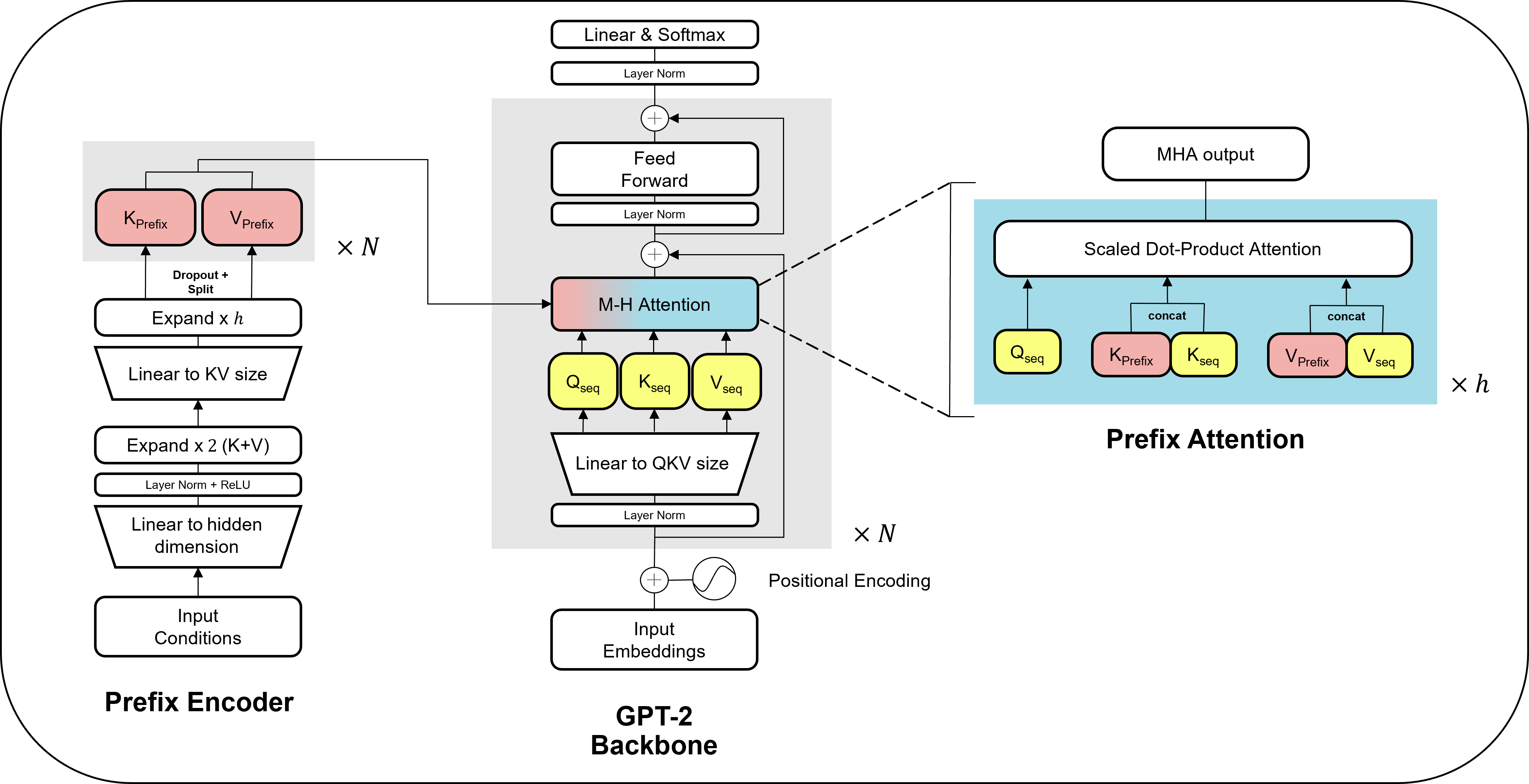
b. Residual-GPT (Residual Attention)
--activate_conditionality="Residual"
Conditioning information is injected into each attention block through a slider mechanism. At each token generation step, separate attention mechanisms process the main text and conditioning information (using the same query), and their outputs are combined with a weighted sum. This also allows conditions to be omitted or left unspecified, resulting in softer conditioning.
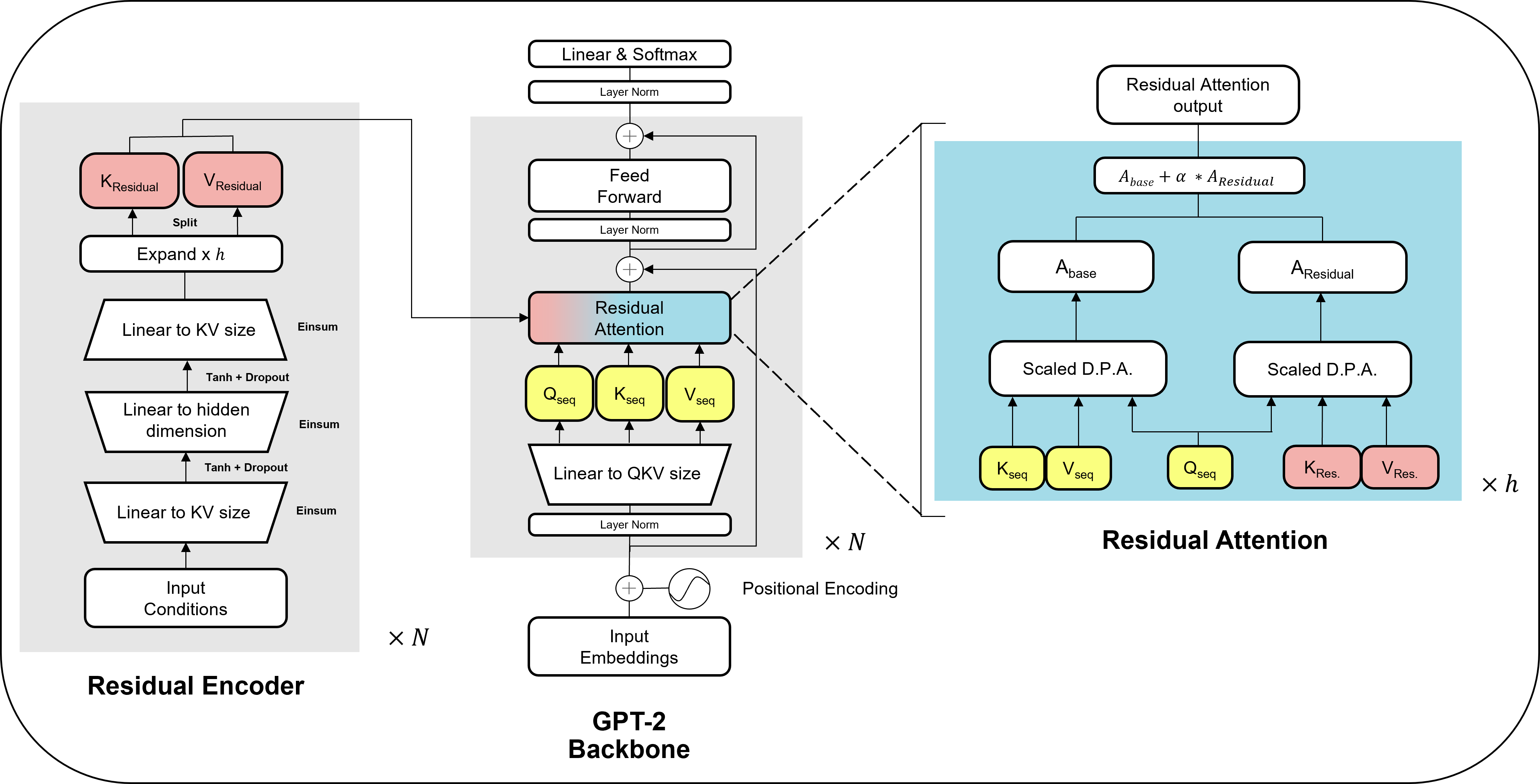
Paper-era checkpoints
Models released with the paper were trained with earlier implementations of the same two conditioning mechanisms. These are named PKV (prefix) and Slider (residual) in the code, and Prefix attention and Residual attention in the paper. They are loaded and used automatically based on the model name, so you can use them in the _load_and_generate.py script. The two generations remain separate classes because their weights are not interchangeable, since we made some minor improvements to the model internals. Training these legacy classes is disabled, and --activate_conditionality="PKV" or "Slider" raises an error pointing to the current implementations.
The paper also benchmarks two comparative baselines, Prepend-GPT and Raw-GPT. These are available in the reproduction repository CrystaLLM-pi-paper.
Available Pre-trained Models
Each released model exists because a paper study or tutorial produced it. This table keeps track of all available models in the zoo as they come out.
| Model | Class | Conditioning | Origin |
|---|---|---|---|
c-bone/CrystaLLM-pi_ft_alex_mp_20-text |
GPT-2 | unconditional | Recommended base model, a LeMat-Bulk pretrained model fine-tuned on Alex-MP-20 CIFs |
c-bone/CrystaLLM-pi_base |
GPT-2 | unconditional | LeMat-Bulk base model from the first paper |
c-bone/CrystaLLM-pi_mp_20_base |
GPT-2 | unconditional | MP-20 text only model for LeMat-Bench |
c-bone/CrystaLLM-pi_alex_mp_20_base |
GPT-2 | unconditional | Alex-mp-20 text only model for LeMat-Bench |
c-bone/CrystaLLM-pi_SLME |
Prefix | solar efficiency (SLME), 0-33% | SLME discovery study, maintained in T4_SLME |
c-bone/CrystaLLM-pi_bandgap |
Prefix | bandgap + stability, 0-18 eV / 0-5 eV/atom | Pretraining-benefits study (B1a notebook in the paper repository) |
c-bone/CrystaLLM-pi_density |
Prefix | density + stability, 0-25 g/cm3 / 0-0.1 eV/atom | Dataset-size study (B2 notebook in the paper repository) |
c-bone/CrystaLLM-pi_Mattergen-XRD |
Residual | XRD peak-picked | XRD recovery studies (X_XRD_* notebooks in the paper repository) |
c-bone/CrystaLLM-pi_Chili100K-XRD |
Residual | XRD peak-picked | CHILI-100K recovery study from the first paper CHILI-100K notebook |
Model metadata, including the model class, conditioning variables, and normalisation, is stored in _utils/model_registry.json. To generate with a model that is not listed above with the _load_and_generate.py script, provide a JSON file with the same schema through --model_registry. See notebooks/T1_finetune_density_example.ipynb for complete workflow, from fine-tuning a density model to uploading, registering, and generating with it.